How to Create an ExpertOption Account in 2026: Complete Registration Guide for Beginners

In this complete guide, you’ll learn how to create an ExpertOption account step by step, what information you’ll need, and how to set up your account so you can begin trading with confidence.

ExpertOption Registration Guide: How to Create Your Account and Start Trading
What is ExpertOption?
ExpertOption is a globally recognized online trading platform that enables traders of all experience levels to participate in financial markets through binary options trading. Whether you are a complete beginner exploring trading for the first time or an experienced trader looking for a reliable platform, ExpertOption offers the tools and environment to support your goals.
The platform supports trading across a diverse range of assets, including major currency pairs, global stocks, commodities like gold and oil, and popular cryptocurrencies such as Bitcoin and Ethereum.
With a presence in over 150 countries and millions of registered users worldwide, ExpertOption has established itself as one of the most accessible and beginner-friendly platforms in the binary options space.
Why Create an ExpertOption Account?
Before diving into the registration steps, it helps to understand what you get access to once your account is set up:
- Demo Account with $10,000 virtual funds — practice trading with zero financial risk
- Real-money trading with a minimum deposit as low as $10
- Over 100 tradeable assets across multiple markets
- Fast order execution with trades settled in as little as 60 seconds
- Mobile trading via iOS and Android apps
- 24/7 customer support through live chat
- Bonuses and promotions for new registered users
Creating an account takes less than two minutes, and you can start exploring the platform on a demo account immediately after signing up — no deposit required.
What You Need Before Registering
- Getting started is simple, but having the following ready will make the process even smoother:
- A valid email address that you have access to
- A secure password (at least 8 characters, mixing letters and numbers)
- Alternatively, a Google, Facebook, or Apple account for one-click signup
- A device with a stable internet connection (desktop, tablet, or smartphone)
No documents are required at the registration stage. ExpertOption verification is usually required after making a deposit and may be needed before certain withdrawals or account limits are unlocked.
How to Access Your ExpertOption Account – Complete Register Instructions
Step 1: Open the Official ExpertOption Platform
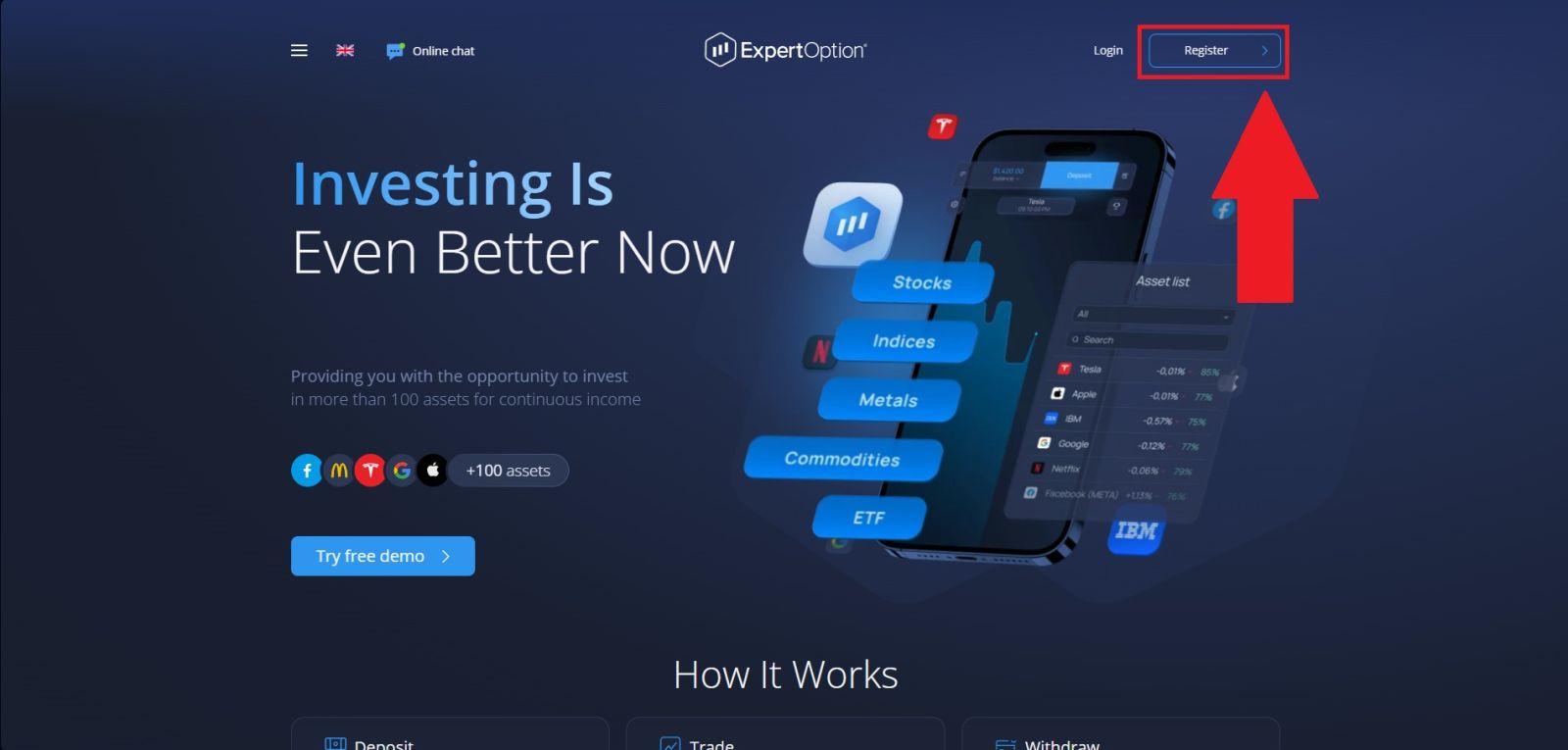
Begin by navigating to the official ExpertOption website using your web browser. Before entering any personal information, double-check that the website address is legitimate and secure. This helps protect your account from fake websites and phishing scams.
ExpertOption is designed with a simple and easy-to-use layout, allowing traders to quickly find the tools and account features they need. On the main page, locate the “Register” option and click it. You will then be taken to the account access page, where you can enter your registered email address and password to sign in securely.
Step 2: Provide Your Account Information
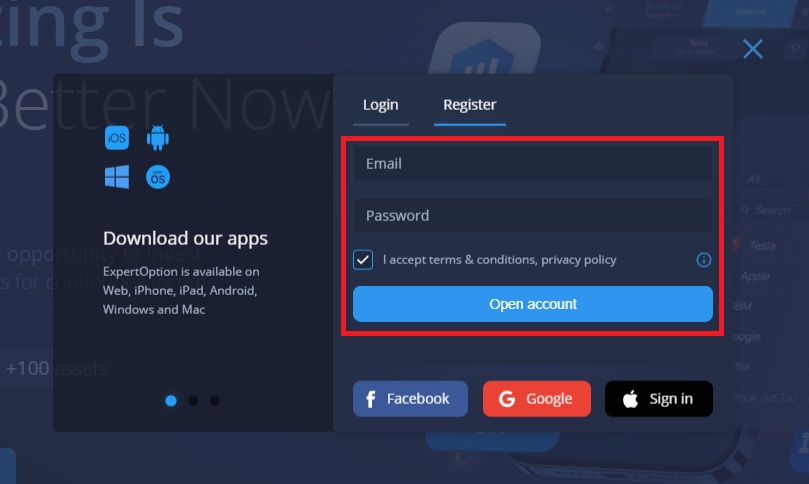
Enter your email address and choose a secure password for your new ExpertOption account. Next, confirm that you agree to the platform’s Terms Conditions by checking the required box.
Once everything is completed, click “Open Account” to finish the registration process. If you prefer a quicker setup, you can also create an account using your Facebook, Google, or Apple profile with just a few clicks.
Step 3: Enter the ExpertOption Trading Platform
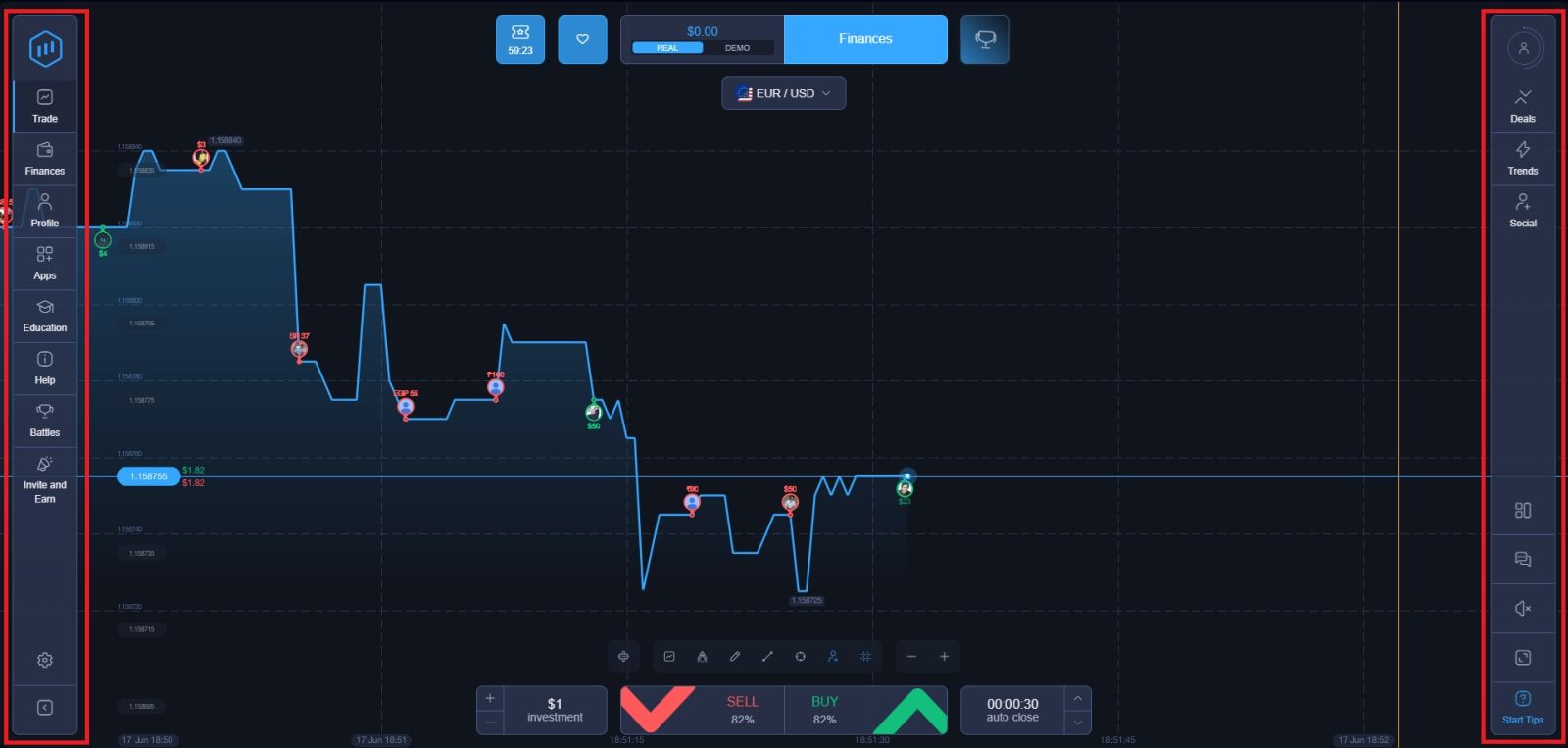
Congratulations! Your ExpertOption account has been created successfully and you can now access the platform.
After logging in, you will be taken to your account dashboard, where you can manage your profile, explore the trading interface, make deposits, request withdrawals, and monitor your trading activity. From here, you can also switch between a demo account and a real account, allowing you to start practicing or trading right away.
Tips for Keeping Your ExpertOption Account Secure
Once your account is active, protecting it should be a priority:- Use a unique password that you do not use on any other website
- Enable two-factor authentication if available for an extra layer of security
- Never share your login details with anyone, including customer support agents
- Log out after each session especially when using a shared or public device
- Be alert to phishing emails that mimic ExpertOption communications
What to Do After Registration
With your account created and verified, here are the recommended next steps to get the most out of ExpertOption:- Explore the demo account — trade with virtual funds to learn how the platform works
- Study the asset list — identify which markets interest you most
- Make your first deposit — the minimum is as low as $10 to start real trading
- Claim your welcome bonus — check for any available promotions for new users
- Start with small trades — build confidence before increasing your investment amounts
👉 Ready to deposit? Add Funds to ExpertOption
👉 New to trading? Learn How to Trade on ExpertOption
Conclusion: Create Your ExpertOption Account and Start Trading with Ease
Opening an ExpertOption account is a simple and beginner-friendly process that allows you to access the platform’s trading features in just a few steps. By completing the registration accurately and setting up your account properly, you can enjoy smooth access to trading tools, account management features, and funding options.
Taking the time to verify your information and secure your account will help ensure a safer and more reliable trading experience. Once your account is ready, you can confidently begin exploring the markets and developing your trading skills on ExpertOption.